Limited Time Offer!
For Less Than the Cost of a Starbucks Coffee, Access All DevOpsSchool Videos on YouTube Unlimitedly.
Master DevOps, SRE, DevSecOps Skills!
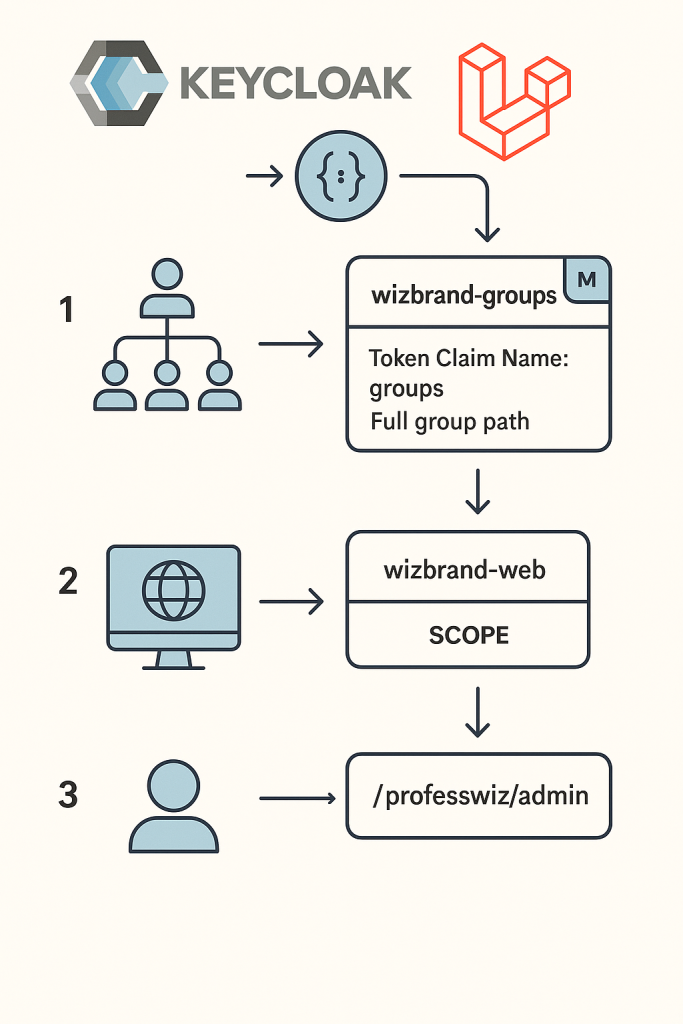
This guide explains how to configure Keycloak so that your Laravel app (wizbrand-web) receives organization and role membership in the user’s token.
We’ll use Groups to represent organizations and their roles, then expose them via a Group Membership mapper.
Why Groups?
In wizbrand, a user can belong to multiple organizations with different roles (Admin, Manager, User).
For example:
- Ashwani is Admin in Org 123
- Ashwani is Manager in Org 456
We want Keycloak tokens to reflect this like:
"groups": [
  "/org-123/admin",
  "/org-456/manager"
  "/org-346/user"
]
Your Laravel app can then enforce access easily by parsing the groups claim.
Step 1 — Create a Client Scope with Group Membership
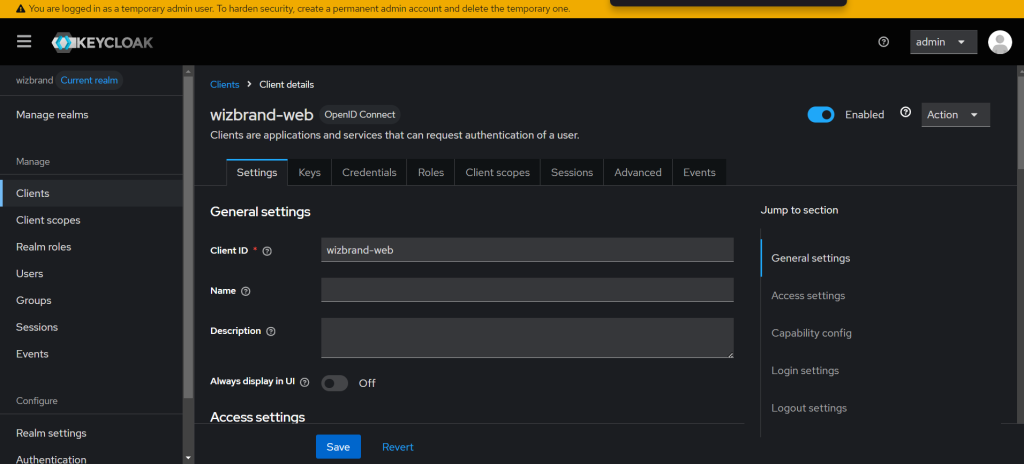
Instead of configuring mappers directly on the client, the recommended approach is to use Client Scopes (reusable across clients).
- Go to Client Scopes
- Left sidebar → Client scopes →
Create client scope.
- Left sidebar → Client scopes →
- Fill details
- Name:
wizbrand-groups - Type:
Default - Protocol:
openid-connect - Click Save.
- Name:
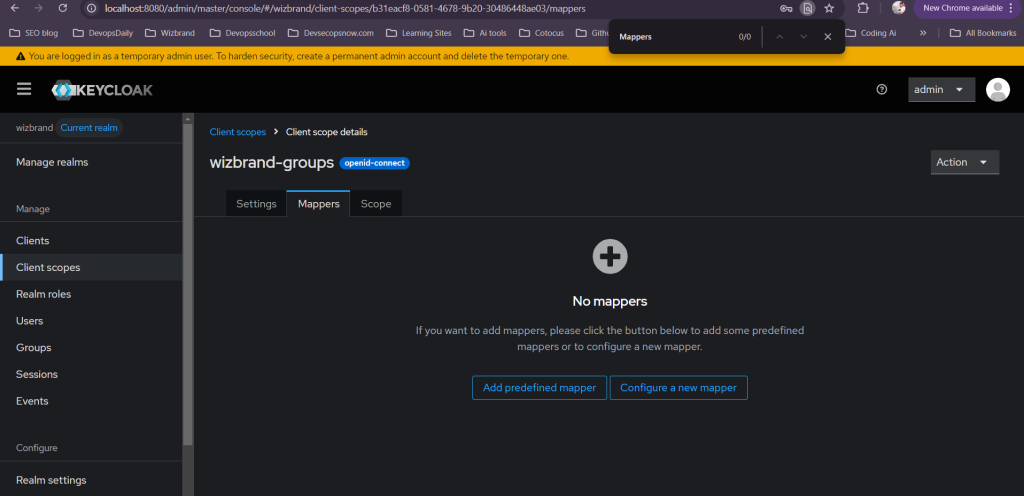
- Add Group Membership mapper
- Inside
wizbrand-groups→ Mappers tab →Add mapper. - Mapper Type:
Group Membership - Name:
groups - Token Claim Name:
groups - Full group path: ON
- Add to ID token: ON
- Add to Access token: ON
- (Optional) Add to Userinfo: ON (useful for debugging)
- Click Save.
- Inside
This ensures every token will carry group memberships like /org-123/admin.
Step 2 — Attach the Client Scope to wizbrand-web
Now attach the scope to your Laravel client:
- Navigate to Clients
- Left sidebar → Clients → select
wizbrand-web.
- Left sidebar → Clients → select
- Open Client Scopes tab
- Under Assigned Default Client Scopes, click
Add client scope. - Select
wizbrand-groups. - Assign as Default.
- Under Assigned Default Client Scopes, click
Now, every login via wizbrand-web automatically includes the groups claim.
Step 3 — Model Organizations with Groups
We’ll use groups in Keycloak to represent organizations and roles.
- Create parent group for each organization
- Left sidebar → Groups →
New. - Example:
/org-123
- Left sidebar → Groups →
- Add subgroups for roles
- Inside
/org-123, create:/org-123/admin/org-123/manager/org-123/user
- Inside
- Assign users to the correct subgroup
- Example:
- Ashwani →
/org-123/admin - Priya →
/org-123/manager
- Ashwani →
- Example:
Later, you can automate this with the Keycloak Admin REST API.
Step 4 — Verify with Token Evaluation
- Go to:
Clients →wizbrand-web→ Client scopes →Evaluate. - Choose a test user who belongs to a group (e.g.,
/professwiz/admin). - Click Generate token → Decode the JSON.
You should see output like:
{
  "exp": 1758707369,
  "iat": 1758707069,
  "iss": "http://localhost:8080/realms/wizbrand",
  "aud": ["realm-management", "account"],
  "azp": "wizbrand-web",
  "name": "Ashwanik Kumar",
  "preferred_username": "ashwanik",
  "email": "ashwanik@ashwanik.com",
  "groups": [
    "/professwiz/admin"
  ]
}
✅ groups claim is present and shows full path.
Mental model (single, consistent source of truth)
- Organizations are groups
Each org is a parent group in Keycloak:/org-{ORG_ID}(e.g.,/org-123). - Roles are subgroups
Under each org group, create fixed subgroups:/org-123/admin,/org-123/manager,/org-123/user. - Membership = authorization
Put a user into one or more of those subgroups. That’s your authorization state. - Tokens carry memberships
The Group Membership protocol mapper projects these into the user’s tokens as:"groups": [ "/org-123/admin", "/org-456/manager" ] - Laravel enforces
Your app readsgroups, derives(orgId, role)pairs, and gates UI + API access accordingly.
Result: No scattered role flags, no per-app duplication. Keycloak is the single source of truth for org/role membership.
Why “full group path = ON” is crucial
Turning on Full group path ensures you don’t just get admin, but the org context, e.g. /org-123/admin.
This solves two hard problems in one go:
- Multi-org users: You can tell which org a role belongs to.
- Name collisions: Every org has an
adminsubgroup—paths keep them distinct.
Role semantics (keep it simple & predictable)
Define a clear, system-wide convention:
- Admin: full CRUD on org resources; can invite/promote/demote members.
- Manager: read + update on org resources; cannot manage members (or limit to specific domains, e.g., SEO panel).
- User: read-only.
Tip: Keep the ladder strictly increasing (User ⟶ Manager ⟶ Admin). This makes role precedence trivial: if a user is both
/org-123/userand/org-123/admin, treat them as Admin fororg-123.
Parsing the groups claim (tiny, reliable helper)
You’ll see entries like:/org-123/admin, /org-15/manager, /org-77/user
A tiny parser turns those into a map you can use everywhere.
Regex: ^/org-(\d+)/(admin|manager|user)$
PHP helper (pure function):
function parseOrgRolesFromGroups(array $groups): array {
    $orgRoles = []; // [orgId => highestRole]
    foreach ($groups as $g) {
        if (preg_match('#^/org-(\d+)/(admin|manager|user)$#', $g, $m)) {
            $orgId = (int)$m[1];
            $role  = $m[2];
            // precedence: admin > manager > user
            $rank = ['user'=>1, 'manager'=>2, 'admin'=>3];
            if (!isset($orgRoles[$orgId]) || $rank[$role] > $rank[$orgRoles[$orgId]]) {
                $orgRoles[$orgId] = $role;
            }
        }
    }
    return $orgRoles; // e.g., [123=>'admin', 456=>'manager']
}
Why this matters:
- Works for any number of orgs.
- Enforces role precedence deterministically.
- Keeps controller/middleware logic clean.
Laravel integration (end-to-end)
A) Capture tokens at login (Socialite)
You already get tokens from the Socialite Keycloak driver:
$kcUser       = Socialite::driver('keycloak')->user();
$accessToken  = $kcUser->token;
$idToken      = $kcUser->accessTokenResponseBody['id_token'] ?? null;
$refreshToken = $kcUser->refreshToken ?? null;

// Store minimally & safely (session or encrypted store)
session([
  'kc_access_token'  => $accessToken,
  'kc_id_token'      => $idToken,
  'kc_refresh_token' => $refreshToken,
]);
Prefer using the ID token to read
groups(it’s meant for the client).
For backend APIs, validate Access token on each call if needed.
B) Decode token & cache groups
Use a lightweight JWT decode (no network) to read claims. You don’t need to verify the signature for UI decisions if you trust your session boundary—but for API/critical actions, validate the token or call introspection.
function readGroupsFromIdToken(?string $idToken): array {
    if (!$idToken) return [];
    $parts = explode('.', $idToken);
    if (count($parts) !== 3) return [];
    $payload = json_decode(base64_decode(strtr($parts[1], '-_', '+/')), true);
    return $payload['groups'] ?? [];
}
Then parse & cache:
$groups  = readGroupsFromIdToken(session('kc_id_token'));
$orgMap  = parseOrgRolesFromGroups($groups);

// Cache for a short time to avoid re-parsing
cache()->put('orgRoles:'.auth()->id(), $orgMap, now()->addMinutes(10));
C) Middleware to guard org routes
Create EnsureOrgRole.php:
namespace App\Http\Middleware;

use Closure;
use Illuminate\Http\Request;

class EnsureOrgRole
{
    public function handle(Request $request, Closure $next, string $minRole)
    {
        $orgId = (int) $request->route('orgId'); // or from header/body, but prefer route param
        $orgRoles = cache()->remember('orgRoles:'.auth()->id(), 600, function () {
            $groups = readGroupsFromIdToken(session('kc_id_token'));
            return parseOrgRolesFromGroups($groups);
        });

        if (!isset($orgRoles[$orgId])) {
            abort(403, 'Not a member of this organization.');
        }

        $rank = ['user'=>1, 'manager'=>2, 'admin'=>3];
        $actual = $orgRoles[$orgId];

        if ($rank[$actual] < $rank[$minRole]) {
            abort(403, "Requires role {$minRole} or higher.");
        }

        // Optionally, attach resolved role for downstream use
        $request->attributes->set('orgRole', $actual);

        return $next($request);
    }
}
Register middleware alias in app/Http/Kernel.php:
'org.role' => \App\Http\Middleware\EnsureOrgRole::class,
Use it in routes:
Route::middleware(['auth', 'org.role:manager'])
     ->get('/orgs/{orgId}/projects', [ProjectController::class, 'index']);

Route::middleware(['auth', 'org.role:admin'])
     ->post('/orgs/{orgId}/members', [MemberController::class, 'invite']);
UI can also read
orgRolefrom the request to enable/disable buttons, tabs, and actions.
D) Policies (optional, nice for model-level checks)
public function update(User $user, Project $project)
{
    $orgId   = $project->org_id;
    $orgRole = request()->attributes->get('orgRole')
               ?? parseOrgRolesFromGroups(readGroupsFromIdToken(session('kc_id_token')))[$orgId] ?? null;

    return in_array($orgRole, ['manager','admin'], true);
}
Multitenancy hardening (don’t trust client input)
- Never trust
orgIdsent by the client to decide access. Always cross-check with thegroupsclaim. - For data queries, filter by orgId after authorization (e.g.,
where('org_id', $orgId)), and never leak cross-org records. - If you pass tokens to microservices, have those services re-validate the Access token (either via JWKS or Keycloak introspection).
Lifecycle: invites, promotions, removals
- Invite: On accept, add user to
/org-123/user. - Promote: Move
/org-123/user→/org-123/manager(or add both; the precedence logic still works). - Remove: Remove all
/org-123/*for that user.
Changes reflect in new tokens. If you need near-instant enforcement, use short token TTL (e.g., 5–15 min) and refresh on sensitive screens; or call token introspection on critical actions.
Admin API snippets (automation-friendly)
Create org + role subgroups
# Get token for admin user (confidential client flow or direct access grant for tooling)
KC_BASE="https://kc.example.com/realms/wizbrand"
TOKEN=$(curl -s -X POST "$KC_BASE/protocol/openid-connect/token" \
  -d grant_type=password -d client_id=admin-cli -d username=admin -d password=... \
  | jq -r .access_token)

# Create /org-123
ORG_JSON='{"name":"org-123"}'
ORG_ID=$(curl -s -D - -o /dev/null -X POST "https://kc.example.com/admin/realms/wizbrand/groups" \
  -H "Authorization: Bearer $TOKEN" -H "Content-Type: application/json" \
  -d "$ORG_JSON" | awk -F/ '/Location:/ {print $NF}')

# Create subgroups
for r in admin manager user; do
  curl -s -X POST "https://kc.example.com/admin/realms/wizbrand/groups/$ORG_ID/children" \
    -H "Authorization: Bearer $TOKEN" -H "Content-Type: application/json" \
    -d "{\"name\":\"$r\"}"
done
Add a user to /org-123/admin
- Find subgroup ID for
adminunderorg-123. PUT /admin/realms/{realm}/users/{userId}/groups/{groupId}with an empty body.
You can wrap this in your Org Service so developers never touch raw Keycloak APIs.
Performance & token size
- A user in hundreds of orgs means many
groupsentries. That increases token size. - Mitigations:
- Keep names compact (
/org-123/adminis good). - Use Access tokens for API auth, store a compact org role map server-side (Redis) after first parse.
- Consider “lazy” authorization for non-critical pages (resolve on demand).
- Keep names compact (
Security checklist
- Confidential client for server-side apps; keep client secret safe.
- Short token TTL + refresh tokens for better revocation latency.
- Enable HTTPS everywhere (no mixed content).
- Validate JWT signatures on backend services (JWKS).
- Rate-limit sensitive endpoints (invites, promotions).
- Log who changed which membership and when.
Testing matrix (copy/paste into QA doc)
- User in one org as user → can view, cannot update.
- User promoted to manager → can update, cannot manage members.
- User promoted to admin → full CRUD + member management.
- User in two orgs (admin in 123, user in 456) → admin powers only in 123.
- User removed from org → loses access after token refresh / re-login.
- Token expires while active → refresh works, groups remain consistent.
- API call with tampered orgId → blocked by middleware.
- Very large memberships → app still responsive (caching is effective).
Common pitfalls & fixes
- “Groups not in token”
Ensure the Client Scope with the Group Membership mapper is attached as Default towizbrand-web. - “Only role names, no org path”
You forgot Full group path: ON in the mapper. - “Change in KC not reflected”
Token still valid. Use shorter TTL, or refresh token after admin changes. - “Got redirected to master realm”
Double-check Socialite Keycloak config:realmmust bewizbrandand the issuer/redirect URLs must point to the right realm paths.
Putting it all together (the 5-step recipe)
- Keycloak groups:
/org-{id}→admin|manager|user. - Client scope:
wizbrand-groupswith Group Membership mapper (Full path: ON, added to ID & Access tokens). - Attach scope to
wizbrand-webas Default. - Parse
groupsin Laravel with a tiny helper to get[orgId => role]with precedence. - Enforce with middleware and (optionally) policies; cache the parsed map for speed.