
Limited Time Offer!
For Less Than the Cost of a Starbucks Coffee, Access All DevOpsSchool Videos on YouTube Unlimitedly.
Master DevOps, SRE, DevSecOps Skills!
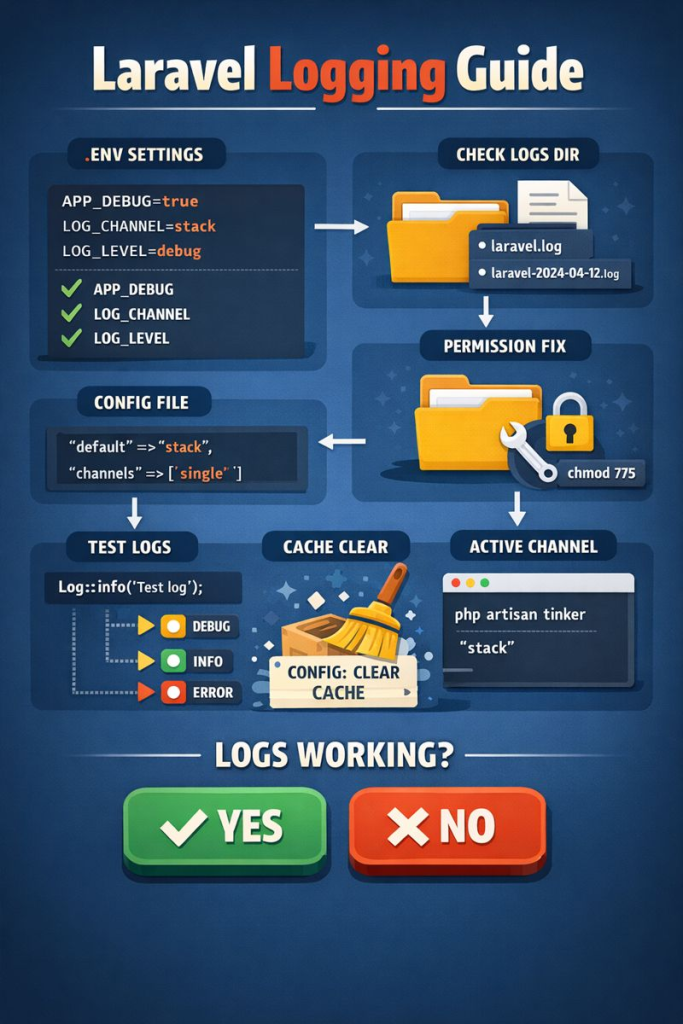
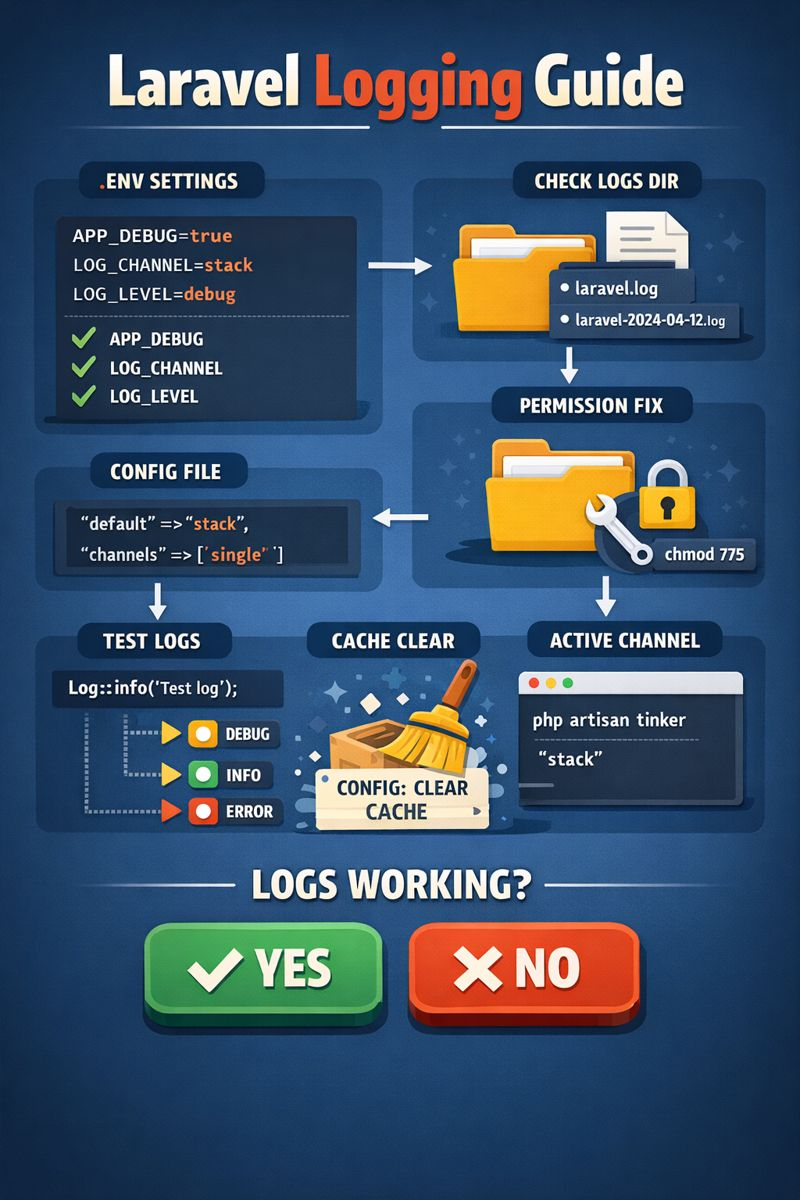
Logging is one of the most critical yet misunderstood parts of any Laravel project. Whether you are debugging a production issue, tracking API failures, auditing user behavior, or simply trying to understand what your application is doing internally, Laravel logs are your first and most reliable source of truth.
In real-world projects, logging is often configured by a teammate, inherited from an older codebase, or partially customized. This leads to common problems such as:
- Logs not appearing at all
- Logs going to unexpected locations
- Debug logs missing in production
- Configuration changes not taking effect
- Teammates claiming “logging is enabled” but nothing works
This tutorial is designed to solve all of those problems.
By the end of this guide, you will:
- Fully understand how Laravel logging works internally
- Be able to verify and control logging even if a teammate configured it
- Know exactly where logs are written and why
- Debug missing logs confidently
- Apply logging best practices that scale in real production systems
This guide applies to Laravel 8, 9, 10, and newer versions.
How Laravel Logging Works (Conceptual Overview)
Laravel uses a powerful logging system built on top of Monolog, an industry-standard PHP logging library.
At a high level, Laravel logging consists of four layers:
- Your code – where you call
Log::info(),Log::error(), etc. - Log channels – define where logs go (files, daily files, stderr, Slack, etc.)
- Environment configuration – controlled via
.env - Storage destination – usually files inside
storage/logs
Understanding these layers is the key to mastering Laravel logs.
Step 1: Verifying Logging Configuration in .env
The .env file is the single most important place for logging configuration.
Open the .env file in your Laravel project root.
Recommended Logging Configuration for Development
APP_ENV=local
APP_DEBUG=true

LOG_CHANNEL=stack
LOG_LEVEL=debug
What Each Setting Means (Plain English)
- APP_ENV
Defines the environment (local, staging, production). Logging behavior often changes based on this. - APP_DEBUG
Enables detailed error output and stack traces. Should betruein development,falsein production. - LOG_CHANNEL
Controls which logging channel Laravel uses by default. - LOG_LEVEL
Determines how verbose logs are.debuglogs everything.errorlogs only serious issues.
If your teammate changed LOG_CHANNEL, logging may still be working—but not where you expect.
Step 2: Understanding config/logging.php in Depth
Laravel’s entire logging system is defined in:
config/logging.php
Default Log Channel
'default' => env('LOG_CHANNEL', 'stack'),
This means Laravel reads the channel from .env.
If .env says LOG_CHANNEL=daily, then daily is used.
The Stack Channel (Most Common)
'stack' => [
    'driver' => 'stack',
    'channels' => ['single'],
    'ignore_exceptions' => false,
],
The stack channel allows multiple log channels to be combined.
Common variations your teammate might have used:
['single']['daily']['stderr']- A mix of file + external services
Single vs Daily Logs
Single file logging
'single' => [
    'driver' => 'single',
    'path' => storage_path('logs/laravel.log'),
    'level' => 'debug',
],
Produces:
storage/logs/laravel.log
Daily logging
'daily' => [
    'driver' => 'daily',
    'path' => storage_path('logs/laravel.log'),
    'level' => 'debug',
    'days' => 14,
],
Produces:
laravel-2026-01-05.log
laravel-2026-01-06.log
Many teams silently switch to daily without informing others—this causes confusion when developers look for laravel.log.
Step 3: Confirm Which Log Channel Is Actually Active
Never assume. Always verify.
Run:
php artisan tinker
Then:
config('logging.default');
This shows the actual channel Laravel is using right now.
If it is not what you expect, Laravel is not misbehaving—you are reading the wrong file.
Step 4: Where Laravel Writes Logs (Exact Locations)
By default:
- Single
storage/logs/laravel.log - Daily
storage/logs/laravel-YYYY-MM-DD.log
If your teammate configured:
stderr→ logs go to server outputsyslog→ logs go to system logs- cloud logging → logs may never touch disk
Always confirm before assuming logs are missing.
Step 5: Manually Testing Logging (The Truth Test)
Add this temporarily in any controller or route:
use Illuminate\Support\Facades\Log;

Log::debug('Debug log test');
Log::info('Info log test');
Log::warning('Warning log test');
Log::error('Error log test');
Refresh the page.
If nothing appears in logs, the problem is not your business logic—it is configuration, permissions, or caching.
Step 6: Storage Permissions (Most Common Real-World Failure)
Laravel cannot log if it cannot write to storage.
Linux / Production Servers
chmod -R 775 storage bootstrap/cache
chown -R www-data:www-data storage bootstrap/cache
Windows / XAMPP
Ensure Full Control for:
- storage/
- storage/logs/
- bootstrap/cache/
If permissions are wrong, Laravel fails silently.
Step 7: Clear Cached Configuration (Non-Optional)
Laravel aggressively caches config.
Whenever .env or config/logging.php changes, run:
php artisan config:clear
php artisan cache:clear
php artisan config:cache
Many “logging bugs” are simply stale cached configuration.
Step 8: When a Teammate Has Already Configured Logging
This is extremely common.
You must audit the project.
Search for Logging Usage
Search for:
Log::logger(tap(monolog
Your teammate may have:
- Disabled default channels
- Redirected logs to stdout
- Used environment-specific overrides
Do not trust assumptions—read the code.
Step 9: Logging Levels Explained (Critical for Missing Logs)
Laravel respects severity levels.
From lowest to highest:
- debug
- info
- notice
- warning
- error
- critical
- alert
- emergency
If LOG_LEVEL=error, then:
Log::info()will NEVER appearLog::debug()will NEVER appear
For development, always use:
LOG_LEVEL=debug
Step 10: Best Practices for Professional Laravel Logging
Use Contextual Logs
Log::info('User login attempt', [
    'user_id' => $user->id,
    'ip' => request()->ip(),
]);
Log Boundaries, Not Noise
Good:
- External API calls
- Payment flows
- Authentication events
- Failures and retries
Bad:
- Logging every variable
- Logging inside tight loops without reason
Step 11: Production Logging Recommendations
- Disable
APP_DEBUG - Keep
LOG_LEVEL=infoorwarning - Use daily logs
- Rotate logs automatically
- Never log sensitive data
Logging is a security feature—not just debugging.
Final Checklist (Bookmark This)
.envlogging values verified- Active channel confirmed via Tinker
- Correct log file location identified
- Permissions fixed
- Config cache cleared
- Manual log test successful
If all six are true, Laravel logging is guaranteed to work.
Conclusion
Laravel logging is not complicated—but it is precise.
Most logging issues are caused by:
- Cached configuration
- Wrong log channel assumptions
- Permissions
- Logging levels
- Teammate customizations not communicated
Once you understand the system end-to-end, logging becomes one of your strongest debugging and observability tools.
This guide gives you full ownership of logging in any Laravel project, regardless of who configured it before you.