Limited Time Offer!
For Less Than the Cost of a Starbucks Coffee, Access All DevOpsSchool Videos on YouTube Unlimitedly.
Master DevOps, SRE, DevSecOps Skills!
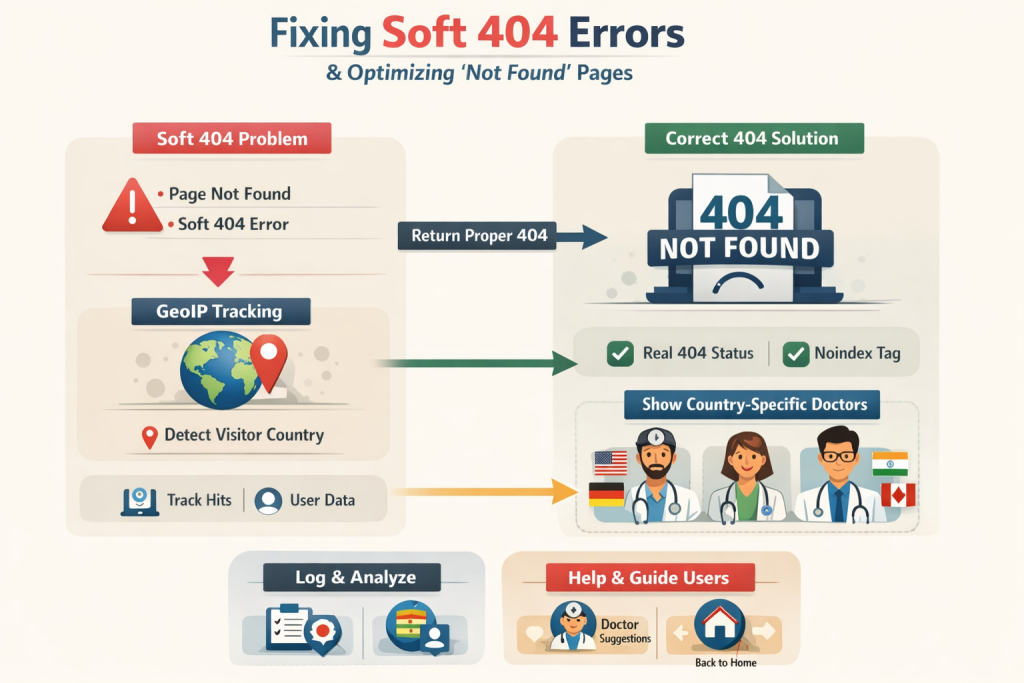
Soft 404 errors are one of the most confusing SEO issues for developers and website owners. Google Search Console shows pages as “Soft 404,” even though those pages load perfectly fine in the browser. This situation often leads to frustration, wasted crawl budget, and poor search visibility.
In this guide, we will deeply understand what a Soft 404 really is, why Google flags it, and how to permanently fix it in a Laravel application. We will also implement an advanced improvement: tracking the visitor’s IP address and showing doctors based on the visitor’s country when data is not found.
This tutorial is written from a real-world production perspective and is suitable for large platforms like healthcare directories, marketplaces, and SaaS applications.
What Is a Soft 404 Error?
A Soft 404 occurs when:
- The server returns HTTP status 200 OK
- But the page content clearly indicates that the resource does not exist
Examples of such content include:
- “No doctor found”
- “We couldn’t find results for your search”
- Empty listing pages with fallback suggestions
Google’s crawler interprets this as misleading behavior. The page says “not found” in content, but the server says “everything is fine.”
Because of this mismatch, Google marks the URL as a Soft 404.
Why Soft 404 Pages Are Bad for SEO
Soft 404 pages create multiple SEO problems:
- Google wastes crawl budget on invalid URLs
- Search Console fills with warnings
- These URLs never rank
- Google loses trust in your URL signals
- Internal linking power is diluted
Most importantly, Soft 404s do not help users or search engines. They sit in a broken middle ground.
The Correct SEO Behavior for “No Data” Pages
When a URL truly has no valid content, the correct behavior is:
- Return HTTP 404 Not Found (or 410 Gone)
- Optionally add
noindex, follow - Still provide helpful suggestions for users
The key point is this:
Google decides Soft 404 vs Real 404 based on HTTP status, not content.
You can show rich content, doctors, hospitals, and CTAs on a 404 page as long as the HTTP status is correct.
Common Mistake in Laravel Applications
In many Laravel projects, developers do something like this:
return view('no-doctor-found', $data);
Laravel defaults to HTTP 200 here.
From Google’s perspective:
- Server: 200 OK
- Page content: “No doctors found”
This triggers a Soft 404.
The Correct Way to Return a 404 in Laravel
Laravel makes this very simple.
Instead of returning a normal view, you must return a response with status code 404.
return response()
    ->view('errors.doctor-soft404', $data, 404);
This single change completely fixes the Soft 404 problem.
Full Controller Example (Production-Ready)
Below is a complete controller flow that:
- Detects when no data exists
- Returns a real 404
- Detects user country from IP
- Shows country-specific doctors
- Logs the missing URL for analytics
use Illuminate\Http\Request;
use App\Models\Doctor;
use App\Models\NotFoundHit;

public function doctorSearchBySlug(Request $request, string $slug)
{
    $doctors = Doctor::query()
        ->where('name', 'like', '%' . $slug . '%')
        ->orWhere('slug', $slug)
        ->get();

    if ($doctors->count() > 0) {
        return view('doctors.search-results', compact('slug', 'doctors'));
    }

    [$countryCode, $countryName] = $this->detectCountryFromIp($request);

    $countryDoctors = Doctor::query()
        ->where('country_code', $countryCode)
        ->limit(12)
        ->get();

    $this->logNotFoundHit($request, $slug, $countryCode, $countryName);

    return response()->view(
        'errors.doctor-soft404',
        compact('slug', 'countryCode', 'countryName', 'countryDoctors'),
        404
    );
}
Detecting Country from Visitor IP
Why IP Detection Matters
Instead of showing generic fallback content, you can personalize the experience by showing doctors relevant to the visitor’s country. This improves:
- User experience
- Engagement
- Conversion rates
Country Detection Method
If you are using a GeoIP database (recommended), the method looks like this:
private function detectCountryFromIp(Request $request): array
{
    try {
        $location = geoip($request->ip());

        return [
            $location->iso_code ?? null,
            $location->country ?? null,
        ];
    } catch (\Throwable $e) {
        return [null, null];
    }
}
This approach is fast, private, and reliable for production use.
Logging Soft 404 Hits for Business Intelligence
Tracking which URLs users are landing on helps you:
- Identify broken internal links
- Discover popular searches with no data
- Create new content strategically
Migration
Schema::create('not_found_hits', function ($table) {
    $table->id();
    $table->string('path')->nullable();
    $table->string('searched_slug')->nullable();
    $table->string('ip', 64)->nullable();
    $table->string('country_code', 10)->nullable();
    $table->string('country_name', 100)->nullable();
    $table->timestamps();
});
Logging Function
private function logNotFoundHit(
    Request $request,
    string $slug,
    ?string $countryCode,
    ?string $countryName
): void {
    NotFoundHit::create([
        'path' => $request->path(),
        'searched_slug' => $slug,
        'ip' => $request->ip(),
        'country_code' => $countryCode,
        'country_name' => $countryName,
    ]);
}
SEO-Friendly 404 Blade Page (Humanized UX)
Your Blade page should:
- Clearly say the content is not found
- Offer helpful alternatives
- Never pretend the page exists
Example structure:
@section('meta')
<meta name="robots" content="noindex, follow">
@endsection

<h1>No doctors found for "{{ $slug }}"</h1>

<p>
We could not find any doctors matching your search.
However, here are some available doctors in
{{ $countryName ?? 'your region' }}.
</p>

@if($countryDoctors->count())
    @foreach($countryDoctors as $doctor)
        <a href="/doctors/{{ $doctor->slug }}">
            {{ $doctor->name }}
        </a>
    @endforeach
@endif
This page is helpful for users and correct for search engines.
What Google Search Console Will Show After Fix
Before fix:
- Status: Soft 404
- Indexing: Not indexed
After fix:
- Status: Not found (404)
- Indexing: Not indexed
This is exactly what Google expects.
There is no penalty.
There is no ranking loss.
This is healthy SEO behavior.
Should You Redirect These URLs Instead?
Redirecting all “not found” URLs to the homepage is a bad practice. Google explicitly discourages this.
Use redirects only when:
- The content moved permanently
- A clear replacement page exists
For missing or invalid search URLs, 404 is the correct response.
Final SEO Best Practices Checklist
- Always return HTTP 404 for real “no data” pages
- Never show “no results” with HTTP 200
- Add noindex for safety
- Track missing URLs
- Show relevant alternative content
- Keep UX helpful, not misleading
Final Conclusion
Fixing Soft 404 errors is not about hiding pages from Google. It is about being honest with search engines. When a URL does not exist, say so clearly using the correct HTTP status.
Once you do this, Google trusts your site more, Search Console becomes clean, and your platform scales better over time.
