Skip to content
Menu
DevSecOps Now!!!
  • About
  • Certifications
  • Contact
  • Courses
  • DevSecOps Consulting
  • DevSecOps Tools
  • Training
  • Tutorials
DevSecOps Now!!!

How to Know Who Accessed Your Server and Check for Threats (GoDaddy, WordPress & HTML Hosting)

Posted on June 9, 2025

Limited Time Offer!

For Less Than the Cost of a Starbucks Coffee, Access All DevOpsSchool Videos on YouTube Unlimitedly.
Master DevOps, SRE, DevSecOps Skills!

Enroll Now

If your website is hosted on a server — especially one that serves WordPress or custom HTML content — securing it is not optional, it’s a necessity. Whether you’re using a VPS, dedicated, or cPanel shared hosting (like with GoDaddy), knowing who accessed your server and what they might have done is a crucial step in preventing website hacks, data theft, and search engine blacklisting.

This guide walks you through how to check server access, investigate unauthorized activity, and detect threats, with a special focus on WordPress and HTML website environments.
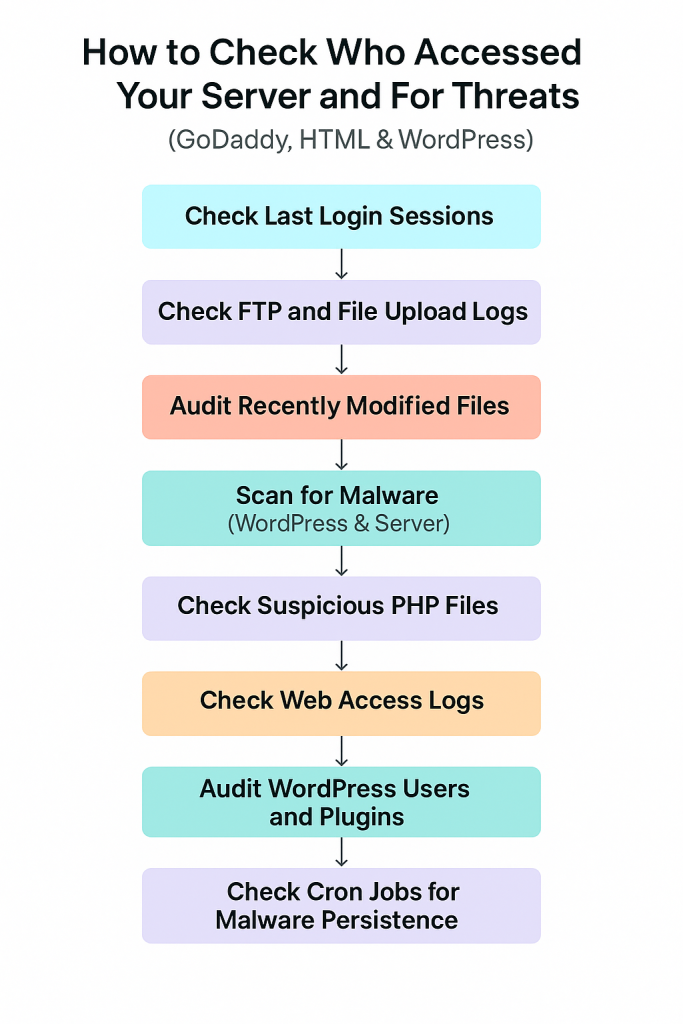

Step 1: Understand the Setup

Before anything, understand how your site is hosted:

  • Shared hosting (cPanel, no root access): Limited server control
  • VPS/Dedicated (SSH/root access): Full control
  • Managed WordPress (GoDaddy Pro): Limited server, but enhanced WordPress management

Why this matters? Because the way you detect access logs and malware differs based on access level.


Step 2: Check Who Accessed Your Server (Login Monitoring)

If your server allows SSH (VPS or dedicated hosting), log in and run:

last -a | head -n 20

This command lists the last 20 login sessions — showing:

  • Username
  • IP address
  • Time of login

If someone unknown appears here, it’s a red flag.

For cPanel:

  • Go to Raw Access Logs under Metrics
  • Download the logs for any suspicious activity

Look for:

  • Access from unfamiliar IPs
  • Brute force attempts
  • Suspicious user-agents like python-requests or curl

Step 3: Check FTP Access

If someone accessed your site through FTP or File Manager, look for logs:

On VPS:

cat /var/log/messages | grep ftp

On GoDaddy shared hosting:

  • Login to cPanel
  • Open File Manager > Logs > Raw FTP Logs (or check FileZilla logs if you used it)

Look for:

  • Connections from unknown locations
  • File uploads to suspicious paths (/wp-content/uploads, /html/tmp, etc.)

Step 4: Identify Recently Modified or Created Files

One of the first things attackers do is modify or upload malicious scripts. Detect this with:

sudo find /var/www/html -type f -mtime -2

This shows files modified in the last 2 days. You can change -2 to -7 for a week.

Pay special attention to:

  • wp-config.php
  • index.php, index2.php, or anything unusual
  • .ico, .php, or .phtml files in wp-content/uploads/

Step 5: Look for Hidden Malware in PHP Files

Most malicious PHP scripts use obfuscated code. Search for patterns like base64_decode, eval, or gzinflate:

grep -r --include="*.php" "base64_decode" /var/www/html

Don’t panic if these terms appear in known plugins/themes — they’re sometimes used for valid reasons. However, if they appear in strange locations or in large, unreadable blobs of code, investigate further.


Step 6: Monitor WordPress Admin Users

Attackers sometimes create fake admin accounts. To review:

  • Login to WordPress Dashboard
  • Go to Users → All Users
  • Look for unfamiliar accounts, especially with:
    • Admin role
    • Generic names like test, admin2, wpuser, etc.

If you find anything suspicious, delete the user and change all admin passwords immediately.

Also consider installing a plugin like Activity Log to track admin actions going forward.


Step 7: Scan for Malware

For WordPress:

Install a security plugin such as:

  • Wordfence (free and powerful)
  • Sucuri
  • MalCare

These tools will:

  • Scan files for malware
  • Check file integrity against original WP core
  • Block known malicious IPs
  • Show you when the site was changed and by whom

For VPS/Dedicated Server:

Run a ClamAV scan:

sudo apt update
sudo apt install clamav
sudo freshclam
sudo clamscan -r /var/www

Or:

sudo apt install rkhunter
sudo rkhunter --check

These tools scan for:

  • Rootkits
  • Known malware signatures
  • Unauthorized cron jobs

Step 8: Review Access Logs from Web Server

Apache:

sudo cat /var/log/apache2/access.log

Nginx:

sudo cat /var/log/nginx/access.log

What to look for:

  • Unusual spike in POST requests
  • Repeated access to xmlrpc.php (often a bot attack)
  • Requests to nonexistent .php files (indicates probing)

Example:

cat access.log | grep ".php"

If you’re seeing requests to /wp-content/uploads/shell.php, that’s almost certainly malicious.


Step 9: Check Scheduled Cron Jobs

Malware often reinfects websites using cron jobs.

crontab -l
sudo crontab -l -u www-data

If you see unfamiliar jobs (like a curl to an unknown site or running a PHP file), delete them.


Step 10: Harden Your Server and Site

Once cleaned, secure your site to prevent future threats:

  • Disable XML-RPC in WordPress if not used
  • Block wp-login.php access to known IPs via .htaccess
  • Use SFTP, not FTP
  • Set file permissions properly (e.g., 644 for files, 755 for folders)
  • Use a firewall plugin or WAF (Cloudflare, Sucuri)
  • Disable file editing in WordPress with: define('DISALLOW_FILE_EDIT', true);

Final Thoughts

Security is not a one-time task. It’s an ongoing process of:

  • Monitoring logs
  • Updating software
  • Auditing users
  • Responding quickly to anomalies

If you feel you’ve been compromised, don’t just fix the visible damage — trace the entry point, remove the root cause, and then rebuild trust with your users.

Post Views: 1,199
  • Check server login history GoDaddy
  • Detect FTP upload attack
  • Detect unauthorized server access
  • GoDaddy server security tutorial
  • How to audit server logs
  • How to detect server access
  • How to find server threats
  • Scan WordPress for malware
  • Secure GoDaddy WordPress site
  • Who accessed my server
  • WordPress login vulnerability check
  • WordPress website hacked solution
Subscribe
Login
Notify of
guest
guest
0 Comments
Oldest
Newest Most Voted
Inline Feedbacks
View all comments
  • Codex vs Claude: A Complete Practical Guide for Modern Developers (2026)
  • Certified AIOps Professional Program A Guide to Career Growth
  • Keycloak Multi-Client Architecture with Project-Based Email Validation (Student, Trainer, Company, Consulting)
  • Incorrect definition of table mysql.column_stats
  • Mautic and PHP 8.3 Compatibility Guide (2026)
  • Certified AIOps Engineer: The Complete Career Path and Certification Guide
  • How to Rename Apache Virtual Host Files Safely (Step-by-Step Guide for Linux)
  • AIOps Foundation Certification: Everything You Need to Know to Get Certified
  • DevOps to Certified Site Reliability Professional: A Senior Mentor’s Guide
  • Certified Site Reliability Manager Training, Preparation, and Career Mapping
  • Certified Site Reliability Architect: The Complete Career Guide
  • What Is a VPN? A Complete Beginner-to-Advanced Tutorial
  • How to Install, Secure, and Tune MySQL 8.4 on Ubuntu 24.04 for Apache Event MPM and PHP-FPM
  • Complete Guide to Certified Site Reliability Engineer Career
  • Certified DevSecOps Professional Step by Step
  • Certified DevSecOps Manager: Complete Career Guide
  • Certified DevSecOps Engineer: Skills, Career Path and Certification Guide
  • Step-by-Step: Become a Certified DevSecOps Architect
  • Tuning PHP 8.3 for Apache Event MPM and PHP-FPM on Ubuntu: A Complete Step-by-Step Production Guide
  • Complete Step-by-Step Guide to Configure Apache Event MPM, Create index.php, Set Up VirtualHost, and Fix Ubuntu Default Page
  • Convert XAMPP Apache to Event MPM + System PHP-FPM
  • The Gateway to System Observability Engineering (MOE)
  • How to Finetune Apache and Prove It Works: A Real-World Guide to Testing Performance, Concurrency, HTTP/2, Memory, CPU, and Security
  • Building a High-Performance Apache Event MPM + PHP-FPM + MariaDB Stack (Advanced Server Optimization Guide)
  • Master Infrastructure as Code: The Complete Hashicorp Terraform Associate Guide
  • Building a High-Performance Apache Server with Event MPM + PHP-FPM (Step-by-Step Guide)
  • Is XAMPP Safer for Production Than Using Apache and PHP as Root? 2026 Practical Guide
  • Unlock Cloud Security Expertise with Certified Kubernetes Security Specialist (CKS)
  • How to Fix wpDiscuz Not Replacing Default WordPress Comments in Block Themes
  • Complete Guide to Certified Kubernetes Application Developer Certification

Recent Comments

  1. digital banking on Complete Tutorial: Setting Up Laravel Telescope Correctly (Windows + XAMPP + Custom Domain)
  2. SAHIL DHINGRA on How to Uninstall Xampp from your machine when it is not visible in Control panel programs & Feature ?
  3. Abhishek on MySQL: List of Comprehensive List of approach to secure MySQL servers.
  4. Kristina on Best practices to followed in .httacess to avoid DDOS attack?
  5. Roshan Jha on Git all Commands

Archives

  • April 2026
  • March 2026
  • February 2026
  • January 2026
  • December 2025
  • November 2025
  • October 2025
  • September 2025
  • August 2025
  • July 2025
  • June 2025
  • May 2025
  • April 2025
  • March 2025
  • February 2025
  • January 2025
  • December 2024
  • November 2024
  • October 2024
  • September 2024
  • August 2024
  • July 2024
  • June 2024
  • May 2024
  • April 2024
  • March 2024
  • February 2024
  • January 2024
  • December 2023
  • November 2023
  • October 2023
  • September 2023
  • August 2023
  • July 2023
  • May 2023
  • April 2023
  • March 2023
  • February 2023
  • January 2023
  • December 2022

Categories

  • Ai
  • AI Blogging
  • AiOps
  • ajax
  • Android Studio
  • Antimalware
  • Antivirus
  • Apache
  • Api
  • API Security
  • Api Testing
  • APK
  • Aws
  • Bike Rental Services
  • ChatGPT
  • Code Linting
  • Composer
  • cPanel
  • Cyber Threat Intelligence
  • Cybersecurity
  • Data Loss Prevention
  • Database
  • dataops
  • Deception Technology
  • DeepSeek
  • Devops
  • DevSecOps
  • DevTools
  • Digital Asset Management
  • Digital Certificates
  • Docker
  • Drupal
  • emulator
  • Encryption Tools
  • Endpoint Security Tools
  • Error
  • facebook
  • Firewalls
  • Flutter
  • git
  • GITHUB
  • Google Antigravity
  • Google play console
  • Google reCAPTCHA
  • Gradle
  • Guest posting
  • health and fitness
  • IDE
  • Identity and Access Management
  • Incident Response
  • Instagram
  • Intrusion Detection and Prevention Systems
  • jobs
  • Joomla
  • Keycloak
  • Laravel
  • Law News
  • Lawyer Discussion
  • Legal Advice
  • Linkedin
  • Linkedin Api
  • Linux
  • Livewire
  • Mautic
  • Medical Tourism
  • MlOps
  • MobaXterm
  • Mobile Device Management
  • Multi-Factor Authentication
  • MySql
  • Network Traffic Analysis tools
  • Paytm
  • Penetration Testing
  • php
  • PHPMyAdmin
  • Pinterest Api
  • Quora
  • SAST
  • SecOps
  • Secure File Transfer Protocol
  • Security Analytics Tools
  • Security Auditing Tools
  • Security Information and Event Management
  • Seo
  • Server Management Tools
  • Single Sign-On
  • Site Reliability Engineering
  • soft 404
  • software
  • SuiteCRM
  • SysOps
  • Threat Model
  • Twitter
  • Twitter Api
  • ubuntu
  • Uncategorized
  • Virtual Host
  • Virtual Private Networks
  • VPNs
  • Vulnerability Assessment Tools
  • Web Application Firewalls
  • Windows Processor
  • Wordpress
  • WSL (Windows Subsystem for Linux)
  • X.com
  • Xampp
  • Youtube
©2026 DevSecOps Now!!! | WordPress Theme: EcoCoded
wpDiscuz